Microsoft removed Publisher from Microsoft 365 on 1 October. If you still have a PC with Publisher 2016, 2019 or 2021, you can convert everything you've made before that copy goes too.
Windows app that batch-converts .pub files
Publisher Converter
Bulk convert whole folders of Microsoft Publisher files to PDF or Word in one go.
From £25, one-off.
School licences £45 (primary) and £95 (secondary).
What it does
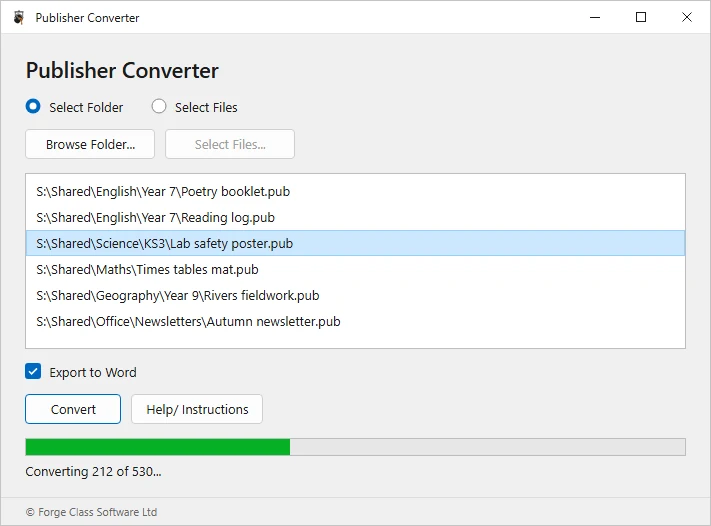
Point it at one folder.
It finds every .pub file inside, however many subfolders deep.
PDF or Word.
Print-ready PDFs (PDF/A for archiving) or .docx files you can edit.
About 500 files an hour, unattended.
Stop it and restart it; it skips files already done.
Nothing leaves your network.
It runs on your own PC against your own drives.
- English\Year 7\Poetry booklet.pubPoetry booklet.pdfPoetry booklet.docx
- English\Year 7\Reading log.pubReading log.pdfReading log.docx
- Science\KS3\Lab safety poster.pubLab safety poster.pdfLab safety poster.docx
- Maths\Times tables mat.pubTimes tables mat.pdfTimes tables mat.docx
- Office\Newsletters\Autumn newsletter.pubAutumn newsletter.pdfAutumn newsletter.docx
- 01A Windows 10 or 11 PC.
- 02Microsoft Publisher installed on that PC: Publisher 2016, 2019 or 2021. Microsoft 365 copies stop opening on 1 October 2026. The converter uses Publisher to open each file.
- 03Permission to read the folders you're converting and to save into them.
How well it converts
PDFs match the original page exactly.
Word output depends on the layout: text-heavy documents come through cleanly; designs built from many layered boxes arrive as text boxes or images and may need tidying.
Prices
Pay by card or purchase order
- Buy for £25
Individual
£25One person. For teachers, freelancers or support staff.
- Buy for £45
Primary school
£45Everyone in one primary school.
- Buy for £95
Secondary school
£95Everyone in one secondary school.
One-off payment. No subscription. Unlimited conversions.
Multi-academy trust? Email enquiries@forgeclass.co.uk for trust pricing.
Free demo
Try it on your own files first.
The free demo converts a limited number of files so you can check the results before buying.
Needs Windows 10 or 11 and Microsoft Publisher installed.